MnemosPersonal RAG. Drop a folder, ask a question — even from your phone.
A personal RAG (retrieval-augmented generation) system that defaults to 100% local — embeddings on your machine, chat on your machine, zero external inference calls in the default install. Drop a folder, ask questions in plain English, get answers with citations to your own files. Then, optionally, pair a private Telegram bot to ask the same questions from anywhere. MIT-licensed. github.com/cosmicflow-space/mnemos.
Repository activitylive from GitHub Traffic API · as of Jul 7, 2026
github.com/cosmicflow-space/mnemos📋The Brief — Why Mnemos Exists
Most RAG tools today are either (a) cloud SaaS that requires uploading your private documents to someone else's servers, or (b) heavyweight self-hosted platforms that demand a separate vector database, container orchestrator, and an afternoon of setup before you ask the first question. Both fail the “I want to ask my own files questions and keep them on my own machine” test.
Mnemos is the opposite of both: a local-first single-user RAG that installs with one command, stores everything in a single SQLite file at ~/.mnemos/mnemos.db, and runs the embedding pipeline locally (BGE-small via ONNX) — so you don't pay an API to index your own files. The chat model is also local by default (Ollama). External LLM plugins (Claude / GPT / Gemini) are opt-in, not required.
What this page IS (and what it isn't)
Mnemos is my first open-source project — a different category from my solo consumer products (CosmicKeys and WatchAlgo). Those I built and host for end users; mnemos I built and release for other developers to run themselves.
- • Personal RAG over your own files
- • 100% local by default — Ollama + BGE-small, zero external inference calls (one-time model weight fetch only)
- • Single-pane UI — everything behind a settings launcher; you never leave chat
- • Ask from your phone via private Telegram bot (default-deny, no public server)
- • MIT-licensed, contribution-welcome (CLA model)
- • Not multi-tenant — single user, one machine
- • Not a SaaS — you run it yourself
- • Not a no-code visual builder — opinionated pipeline, one strong default per stage
- • Not an agent platform — RAG only, deliberately scoped
- • Not production-grade yet — active development, v0.21 (core stable since v0.1)
The CTA is GitHub (clone, run, star, contribute) — not “sign up to try.” There's nothing to sign up for; the install is one command on your laptop.
🖼️What It Looks Like — One Pane, Six Surfaces
Mnemos is built around a deliberate single-pane UI — no drag-and-drop canvas, no setting-storm before you can ask a question. The home page IS the chat page; everything else lives behind the glowing settings launcher at the bottom-left. Click any screenshot to open at full size.
🔒How Private Do You Want It? — Three Tiers
Personal RAG means personal RAG. Privacy is the key — and the default. Mnemos gives you three tiers, in order of increasing data egress. You choose. Most users stay in Tier 1.
- • Embeddings: BGE-small via ONNX, on your machine (first use downloads ~120 MB of weights from Hugging Face once, then cached)
- • Chat: Ollama (wired, default) or bundled
llama.cpp(planned) — on your machine - • Network: zero external inference calls after the one-time model fetch. No chunks of your data leave the machine.
- • Auth: none — no API keys, no OAuth
- • Audit log proves it:
queryevents recordprovider: "ollama"— no external-provider call is ever recorded - • Best for: sensitive data, offline use, full sovereignty
node setup.mjs defaults to this tier.
- • Embeddings: local default (or external if you switch)
- • Chat: Claude / GPT / Gemini — you pick, you provide auth
- • Network: only retrieved chunks (~500–2k tokens) cross the boundary. Never raw files. Never your full corpus.
- • Audit: provider, model, retrieved chunk IDs, prompt-size estimate, latency
- • Best for: frontier-model quality, when you've consciously chosen to share retrieved chunks
The chat UI lets you switch the model per question.
Train a small open model on your own corpus. Stays on your machine. Becomes specifically yours over time. Roadmap consideration — community input welcome.
~/.claude/.credentials.json,~/.codex/auth.json) and surfaces them as detected — but marks them non-importable with a TOS-explanation note. Anthropic explicitly prohibits third-party OAuth reuse; OpenAI does not document it. API key is the only sanctioned method for every external provider. Honesty about credential safety is itself a positioning point.⚡Smart Routing — Pick Files-or-Direct × Model Tier With One Character
Choosing a tier shouldn't mean opening a menu. A single leading sigil on your message picks whether to search your files and which brain answers — no settings, and it works identically on web and on Telegram.
| Local (private, free) | Frontier cheap | Frontier flagship | |
|---|---|---|---|
| Search my files | (no prefix) | + | ++ |
| Skip files (direct) | ! | !! | !!! |
Direct mode — ! (v0.15)
Prefix with ! to bypass retrieval entirely — no embedding, no vector search. The model answers from its own knowledge plus the conversation, with a small session-facts note (active provider + model) injected so “which model am I using?” is answered truthfully. The answer is labeled “Direct · files not searched,” and the audit log records direct: true with empty citations — so each query's privacy posture stays provable.
Frontier on demand — + / repeats (v0.16)
The + family runs RAG over your files but answers with a frontier model; doubling the sigil escalates the tier (cheapest → most capable). Frontier tiers auto-resolve by pricing metadata to the cheapest/most-capable configured provider — no hardcoded provider IDs (local Ollama is excluded since it needs no key). No frontier key set? The request is rejected with a clear “add an API key” prompt instead of failing opaquely.
/cost — usage & spend (v0.16)
Estimated frontier spend computed on-device from your own history (provider-reported tokens × dated per-model pricing): total to date, cost by model, queries split frontier-vs-local, total tokens, session count, most-expensive + longest session. Local queries are free and counted separately. The cost math is a pure, unit-tested function behind GET /api/cost.
/tips — input help (v0.16)
Sends back the routing-prefix cheatsheet from a single shared registry — a table on web, plain text on Telegram, no model call. New shortcuts are added in one place and appear everywhere (the web input legend,/help, and /tips). The web input even shows a live legend that flips to a mode indicator as you type a sigil.
#, @, and / are special in Telegram (hashtag / mention / command), but! and + are inert — so the exact same syntax works on the phone as in the web app. Parsing is one shared pure module used by the web client (optimistic UI), the API route (authoritative — routing can't be spoofed), and the Telegram poller; tier→model resolution is a second shared module. Answers are labeled with the mode + model so the privacy posture is always visible.📥Find It, Add It, Chat With It — /do + /focus (v0.18–0.19)
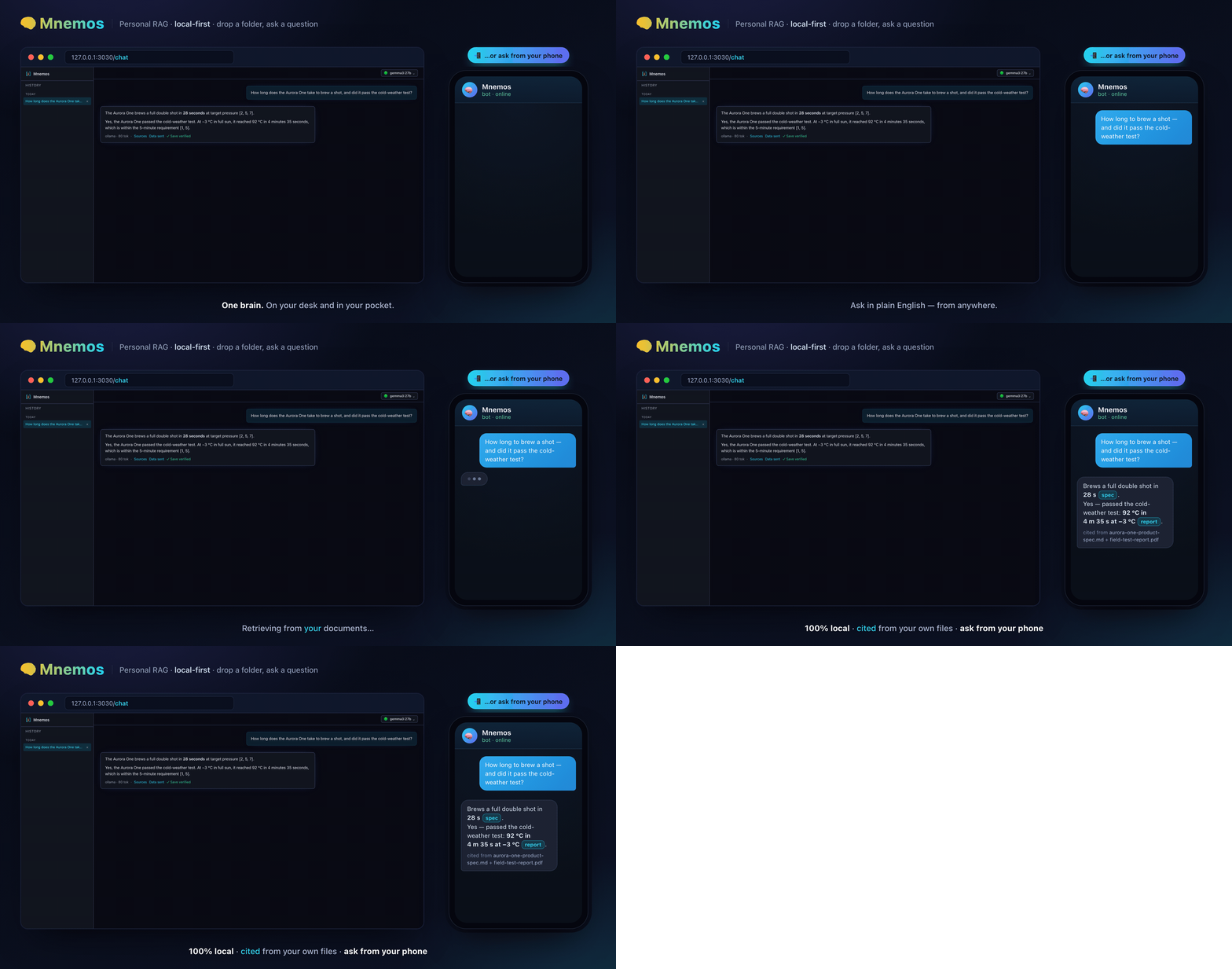
On your computer you have a file browser and can add a whole folder. On your phone you don't — and that's the point. Away from your desk, half-remembering a file's name, you want to find it, pull it into the index, and ask about it. That four-step arc is the feature — and it works in the web chat and on the Telegram bot, as one shared conversation:
/do fs land rover     ① find it — fuzzy, any word order
/do rag 1             ② add it (text, Office, or scanned PDFs via OCR)
/focus land rover     ③ scope the chat to just that file
"what is my VIN?" ④ answered from that file alone → SALWA2VK7HA000000/do fs — fuzzy find
Tokenizes your query (camelCase / spaces / separators) and matches files whose name contains every word, any order — land rover, LandRover, and pearl all hit. Read-only: names, never contents.
/do rag — add & OCR
Adds picked files on demand with a three-tier extractor — pdf-parse → pdftotext → OCR (tesseract.js), so even a scanned VIN PDF becomes readable. Upserts by content hash; PIN-gated; auto-focuses on what you added.
/focus — chat with one file
Scopes the conversation to one document (by name, or by n from a cited Sources list). A small file is loaded whole into context, so “summarize this” works. /done returns to all files.
/do dev clear wipes every chunk, vector, source registration, and chat + audit record in a single transaction, then resets the chat UI in place — sidebar, sources, focus, and the all-time cost readout — with no browser reload. It's deliberately two-step (you reply --confirmed) and never touches your files on disk, your encrypted API keys, your PIN, or your Telegram pairing. The command is web-only by construction: the phone channel is query-only and has no path to it — verified by a three-model AI-partner review (a wipe that left the working-set tables orphaned, and a stale session id surviving in the browser, were both caught and fixed before merge).~/.mnemos/do/ — the entire action surface is ls ~/.mnemos/do/. The model only picks a verb and supplies a validated argument, run with no shell. There is no arbitrary command to analyze because there is no arbitrary command — the same instinct that makes a parameterized query safer than concatenated SQL. Verbs are OS-native (a shell script on macOS/Linux, a PowerShell script on Windows), so /do works across platforms. Reviewed by two independent AI partners before shipping.🎨Light or Dark — Accessible by Design
Mnemos ships two hand-tuned themes and opens in the calm “Zen-Light” theme by default (mint page, white cards, deep-teal ink, a soft pastel-aurora wash); the original “Cosmic” dark theme is one tap away. The same answer, two moods:
Two ways to switch
A floating quick-toggle above the composer (Light / Dark / Hide) and the canonical control in the bottom-left Settings menu — always kept in sync.
Persists & syncs
Your choice is saved per browser (localStorage — never the SQLite knowledge store) and syncs across open tabs. Hide the toggle; restore it from Settings.
AA / AAA, measured
Every accent, link, and placeholder clears WCAG AA (and AAA where it counts) in both themes — verified with a gradient-/oklch-aware contrast probe, not eyeballed.
📲Ask From Your Phone — The Telegram Remote Channel (v0.9)
Your personal RAG runs on your computer — but you don't have to be at your computer to use it. Pair a private Telegram bot and query your indexed documents from anywhere.
No public server, nothing exposed
Mnemos reaches out to Telegram via long polling — so it works behind home NAT with no port-forwarding, no tunnel, no public IP. Same outbound-only posture as everything else in mnemos.
Default-deny, single-use pairing
The bot answers only you. Pairing happens via a single-use, time-boxed, CSPRNG-generated code entered in the UI — any other chat is ignored. DMs only, never groups. Query-only — no source-management commands accepted via Telegram.
Your documents stay home
Only the question and answer pass through Telegram (and whichever model you've configured). Files never leave your machine. Bot token stored chmod-600 at ~/.mnemos/.env, never logged.
Uses your configured model
Local Ollama by default, or Claude / GPT / Gemini if you've set one — the bot mirrors your UI choice. Server-side persisted (MNEMOS_DEFAULT_MODEL) so it survives restarts.
Telegram was reviewed by an AI partner panel (Claude + Gemini + Codex) before v0.9 shipped. The review confirmed: no authorization bypass, no token leakage, atomic pairing logic, no path for unauthorized chats to receive answers. Set up in Settings → 📲 Telegram; there's a built-in step-by-step guide for users new to Telegram bots.
The catch, by design: your computer must be awake with mnemos running for the bot to reply. No cloud backend — by choice.
WhatsApp is on the radar but not yet supported — there's no free, local-first-friendly bot API for it the way Telegram offers.
✓Verified-Answer Memory — Make Small Local Models Nail Facts (v0.5)
Small local models are great for sovereignty but sometimes fumble specific facts. Mnemos lets you tag a correct answer with ✓ Save verified — the Q→A pair is stored, and future closely-matching questions inject that confirmed answer into the prompt. Even a small local model now answers correctly.
Strict semantic match
A verified answer fires only when the new question is semantically close to the original (vector match against verified-Q embeddings). Loose paraphrases caught; unrelated questions left alone.
Lazy content-hash invalidation
A verified answer stops firing once its source chunks change — so when your underlying files update, stale verified answers drop out automatically. No manual cache invalidation.
“✓ verified” badge in chat
Boosted answers carry a visible badge so you always know which answers came from verified memory vs raw retrieval. Transparency over silent magic.
Management view in Settings
Review, edit, or delete your verified answers from Settings → Verified answers. Backed by the verified_answer + vec_verified tables; queryable via /api/verified.
Design rationale + considered-and-deferred alternatives documented in docs/design-notes/verified-answer-memory.md.
🔄Self-Updating Sources — Auto Re-Scan + Pause/Resume
Static archives shouldn't burn background CPU. Hot folders should re-index when they change. Heavy ingests should be pausable. Mnemos handles all three with per-source scheduling, durable pause state, and a live launcher-ring indicator.
Each source has its own re-scan cadence (set when added, editable any time). Default is Manual — most users add static documents and don't want background CPU spent re-scanning them. Point a changing folder at Daily or 5-minute cadence from a dropdown. Re-scans are incremental (content-hash skip), so only changed/new files re-embed. Implemented as a periodic poll via Next.js instrumentation.ts; tunable with MNEMOS_WATCH_TICK_MS, disable with MNEMOS_DISABLE_WATCHER=1.
Pause a running ingest per source — or all at once (“Pause all,” useful before bed or on heavy CPU) — from the Sources panel. Resume continues where it left off (already-finished files are hash-skipped). Pause is durable — persisted to the source.pausedflag — and survives a restart. The background watcher skips paused sources (no auto-resume on next tick). Cooperative: stops at file boundaries, marks any interrupted file partial so resume reprocesses it.
Manual ↻ Re-scan, background watcher, and even multiple server processes coordinate through an atomic DB ingest lease (source.ingesting_since), so the same source is never ingested twice at once (which would race chunk writes). Failed auto-scan stays due and retries next tick. Crashed lease self-heals after 30 minutes.
The settings launcher (bottom-left avatar) reflects live ingestion: breathing cyan ring while ingesting (with a done/total tooltip), amber when paused, red on error. Backed by an in-memory status registry + GET /api/ingest/status; pinned to globalThis so the watcher and routes share one instance.
📁Sources Without Surprises — Files, Folders, Metadata, Counts
Folders or single files (v0.8)
Paste a folder path or an absolute path to a single file. Mnemos auto-detects which. A single explicitly-chosen file bypasses the soft noise filters (since the choice is deliberate) — but the security hard-lock still always applies (a single .env or id_rsa is still refused, including via symlink).
Per-file metadata chunks (v0.8)
Every ingested file carries one extra retrievable chunk describing path, size (human + raw bytes), last-modified date, and type. Metadata questions like “how big is resume.pdf?” or “when was notes.md modified?”retrieve reliably even when no content chunk ranks high. Re-scanning backfills metadata chunks for files indexed before this feature without re-embedding content.
Inventory questions (v0.11)
“How many documents do I have? What types? Which sources?” are now answered from a COUNT-based Library Overview (total files, chunks, by type, by source) injected into the prompt for inventory-intent questions. Gated to inventory questions so normal queries pay no aggregate cost.
Filename retrieval (v0.11)
Questions that name a file (“VIN in ipostal.pdf?”) now co-retrieve that file's content chunks spliced adjacent — bounded by a fixed budget — so the file's synthetic metadata chunk doesn't out-rank and bury its own content at scale.
Containment guard (v0.11)
Adding a folder that's already inside a registered source no longer creates a duplicate — mnemos detects the overlap (realpath + path-boundary check) and refreshes the parent so the subfolder is indexed under it. Adding a folder that contains existing sources warns and offers “Add anyway.” Stops the silent double-ingestion that overlapping sources would otherwise cause.
Hard-locked exclusions (since v0.1)
.env, *.pem, id_rsa*, anything under ~/.aws/ — never indexed even with explicit user opt-in. Soft-default exclusions (logs, lockfiles, hidden dotfiles, files >10 MB) are opt-in to include. The asymmetry — soft defaults for noise, hard locks for credentials — matches the actual risk profile.
🏗️Architecture — Monorepo + Plugin SDK Contract
Mnemos is a pnpm monorepo with a strict separation between the RAG pipeline (in packages/core/) and the providers + loaders (in plugins/). The Plugin SDK in between is the contract that makes mnemos genuinely extensible.
mnemos/
├── apps/web/              # Next.js 15 UI + API routes + instrumentation.ts
│                          #   (background source watcher + Telegram poller)
├── packages/
│   ├── core/              # RAG pipeline: ingest, query, prompt, registry, crypto
│   ├── db/                # SQLite + sqlite-vec wrapper (384-dim vec)
│   ├── plugin-sdk/        # Plugin SDK barrel (apiVersion 0.1)
│   └── cli/               # `mnemos` CLI
└── plugins/
    ├── embed-local/       # BGE-small via ONNX — bundled default
    ├── anthropic/         # Claude (streaming)
    ├── openai/            # Chat + Embeddings (text-embedding-3-small @ 384)
    ├── gemini/            # [planned — scaffolded stub]
    ├── ollama/            # Chat + Embeddings — host-local, default chat
    ├── llama-cpp/         # [planned — scaffolded stub]
    ├── loader-pdf/        # via pdf-parse
    ├── loader-docx/       # Word — via mammoth
    ├── loader-xlsx/       # Excel — via exceljs (per-sheet CSV)
    ├── loader-ocr/        # Images — OCR via tesseract.js (WASM)
    ├── loader-markdown/   # YAML frontmatter parsing
    ├── loader-plaintext/  # .txt, .log, .csv, .json
    ├── loader-web/        # URL ingestion
└── loader-code/ # 25+ source-code extensionsPlugins can only import from mnemos/plugin-sdk. They cannot reach into packages/core/** or other plugins' internals. The SDK is versioned (apiVersion 0.1, additive-only changes within 0.1.x; breaking changes will bump apiVersion) and backward-compatible.
This is what makes mnemos genuinely extensible — third-party plugins won't break when the core changes, because they only touch the SDK barrel. The barrel is small enough to audit and stable enough to depend on.
⚙️Tech Stack
Runtime + Build
- • Node 22+ — only prerequisite for users
- • pnpm monorepo (
pnpm-workspace.yaml) - • TypeScript throughout, strict mode, ES2022, ESM
- • Next.js 15 for the web UI + API routes
- •
instrumentation.tsfor background services (source watcher + Telegram poller)
Storage
- • SQLite — single file at
~/.mnemos/mnemos.db - • sqlite-vec — vector extension wrapped via
packages/db/ - • 384-dim vectors standardized across all bundled embedders
- • No separate vector database — deliberate “free by default” call
Models (local default)
- • BGE-small via ONNX (
@xenova/transformers) — bundled local embedder, 384-dim - • Ollama — default chat provider;
/api/querydefaults toproviderId: "ollama" - • OpenAI text-embedding-3-small (Matryoshka @ 384) + Ollama all-minilm as alternative embedders
Deployment
- •
node setup.mjs— cross-OS installer (macOS / Linux / Windows). ReadsINSTALL.md(executable docs). - •
docker compose up -dfor Docker preference - •
pnpm install && pnpm devmanual path for contributors - • Port + state-dir overrides —
MNEMOS_PORT,MNEMOS_STATE_DIR,MNEMOS_BINDall cross-platform (Windows cmd.exe included since v0.10)
🔌Pluggable Providers — What's Wired
The plugin SDK supports two kinds of providers: chat (LLM completions for answering questions) and embeddings (used at ingest time to vectorize chunks). Mix and match — for example, use local BGE-small for free ingest, then Claude for high-quality chat.
| Plugin | Chat | Embeddings | Status | Notes |
|---|---|---|---|---|
| embed-local | — | ✓ default | Wired | BGE-small via ONNX (bundled, 384-dim) — zero API cost for ingest |
| ollama | ✓ default | ✓ | Wired | Host-local chat (default), no auth, fully offline |
| anthropic | ✓ | — | Wired | Claude streaming — bring your own key |
| openai | ✓ | ✓ | Wired | GPT chat + text-embedding-3-small @ 384 |
| gemini | — | — | Planned | Scaffolded stub; not wired yet. API-key route first; OAuth + Vertex ADC tracked for later |
| llama-cpp | — | — | Planned | Planned bundled local LLM, no separate daemon |
Document loaders (current)
Word loader uses mammoth; Excel uses exceljs rendered per-sheet to CSV-style text; images (.png/.jpg/.tif/.bmp/.webp) are OCR'd to searchable text via tesseract.js (WASM — no system binary). All externalized the same way loader-pdf is, with a loader-resolution regression test. Scanned-PDF OCR, HEIC, and audio / video (local speech-to-text) remain detected and politely deferred — explicit roadmap items.
🗺️Roadmap — Shipped Since v0.1
The core has been stable since v0.1; sixteen minor releases since then have layered on features. The fullCHANGELOGtells the version-by-version story; the highlights:
Shipped (v0.2 → v0.20)
Current- • v0.2 — single-pane UI + settings launcher, per-provider model picker with inline pricing, token cost tracking, rich Markdown output, light/dark theme
- • v0.3 — credential detection (with TOS-honest non-importable OAuth/ADC), per-response Sources + Data sent transparency
- • v0.4 — shell-style chat input (↑/↓ history, Ctrl+C clears), detect newly-installed local models
- • v0.5 — verified-answer memory (Q→A boost for small local models, with lazy invalidation)
- • v0.8 — automatic per-source re-scan (concurrency-safe lease), single-file sources, per-file metadata chunks
- • v0.9 — Telegram remote channel (ask your RAG from your phone), server-persisted model selection, default re-scan switched to Manual
- • v0.10 — PDF ingestion fix in
next dev, cross-platformMNEMOS_PORToverride, refreshed hero GIF + screenshots - • v0.11 — pause/resume ingestion (durable), launcher-ring status indicator, inventory question answers, filename-mention retrieval fix, source-containment guard
- • v0.12 — folder/file picker (server-powered Browse), image OCR (tesseract.js), Word + Excel ingestion, quoted-path fix, credential-dir hard-locks
- • v0.13 — local embedding moved to a worker thread — the UI no longer freezes during a big ingest (12–20s timeouts → ~25ms)
- • v0.14 — model picker that ranks for your machine (speed × accuracy, measured tok/s, ★ recommended, suggests models to pull), smart-auto ingestion (smallest-first + defer-large), dated frontier pricing in the picker
- • v0.15 — direct-to-model mode (
!skips retrieval; audit records it distinctly) - • v0.16 — smart prefix routing (
!/+families: files-vs-direct × model tier),/costspend report,/tipsinput help - • v0.17 —
/doon-demand working-set RAG (fsfind →ragadd, hash-upsert), proof-of-human PIN for writes, cross-platform verbs (macOS/Linux/Windows) - • v0.18 — File Focus Mode (
/focusa file → chat/summarize it alone), fuzzy/do fs(any word order), and on-demand OCR for scanned PDFs (pdf-parse → pdftotext → tesseract.js) - • v0.19 —
/do+/focusin the web chat (PIN modal, focus chip, find→add→focus end to end), and cross-surface session continuity — focus + working-set keyed by session id, so a thread continues phone ↔ browser (“Continue on phone” rebinds the bot)
Directions being explored
Ideas, not promises- • More file types — text, PDF, Word, Excel, and image OCR ship today; scanned-PDF OCR, HEIC, and audio / video (local speech-to-text) remain detected-and-deferred.
- • Better answers — cross-encoder reranking of retrieved chunks; Gemini + bundled
llama.cppproviders fully wired - • Easier installs — npm global install, native macOS/Linux installers
- • More places to ask from — WhatsApp (pending a local-first-friendly API path), email ingestion
- • Tier 3 — fine-tuned local models on your own corpus
These follow the project's north star: local-first, single-operator, RAG — not an agent platform. Rather ship a few things well than promise many.
📜Open Source — License + Contribution
MIT-licensed · Zen Algorithms LLC
The MIT-licensed code stays MIT-licensed. You can use, fork, and modify mnemos for any purpose, commercial or personal.
A CLA via cla-assistant.io applies on first PR (one click, covers all future PRs). It's standard open-source legal hygiene — keeps the licensing flexible if terms ever need to evolve for a specific use case, without having to track down and re-permission every prior contributor. The MIT-licensed code stays MIT-licensed regardless.
AI-assisted contributions welcome
See AGENTS.md for collaboration patterns. Whether you're writing a plugin, fixing a bug, or polishing the UI — Claude Code, Cursor, Copilot, all welcome. The PR review process is the same whether the code came from your hands directly or via a coding agent under your direction.
Security vulnerabilities: report privately via GitHub Security Advisory.
Ready to try it?
git clone https://github.com/cosmicflow-space/mnemos.git && cd mnemos && node setup.mjs — end-to-end on a typical laptop in under 90 seconds, with Ollama as the default chat provider.
Leadership Takeaway
Why I'm releasing this as open source: the personal-RAG category needs a default that isn't “sign up for someone else's SaaS and upload your private docs” or “spend a Saturday wiring six services together.” A local-first single-user RAG that installs with one command — and answers from your phone over a private channel — is the minimum viable shape of that default. Mnemos is my first try at it, released so others can run it, fork it, and improve it.
Why the framing is “100% local by default” specifically: the audit log proves it by inspection. Open Tier 1 install, run a query, inspect /api/audit — every query event records provider: "ollama". No external-provider call is ever recorded. “Privacy by default” isn't a marketing claim — it's a property you can verify from the database.
What I want from the community: opinionated feedback. Run it against your folders. Pair the Telegram bot and ask questions from your phone. Tell me which file types broke, which prompts produced weird answers, which security defaults are too tight or too loose. File issues. Send PRs. Eleven minor releases in under two weeks because the architecture is absorbing real use. That window is still open.